Step-by-Step From the Simplest Fix to the Most Complex
A phone that won’t charge is one of the most common issues we see at Mobile Lizard in Baltimore — and it has more potential causes than most people realize. The good news is that the majority of charging problems have straightforward explanations that you can work through systematically.
We covered this briefly in our complete charging guide — but here’s the full diagnostic sequence.
Layer 1: The Accessories
Start here every time, because it’s the most common cause and the cheapest fix.
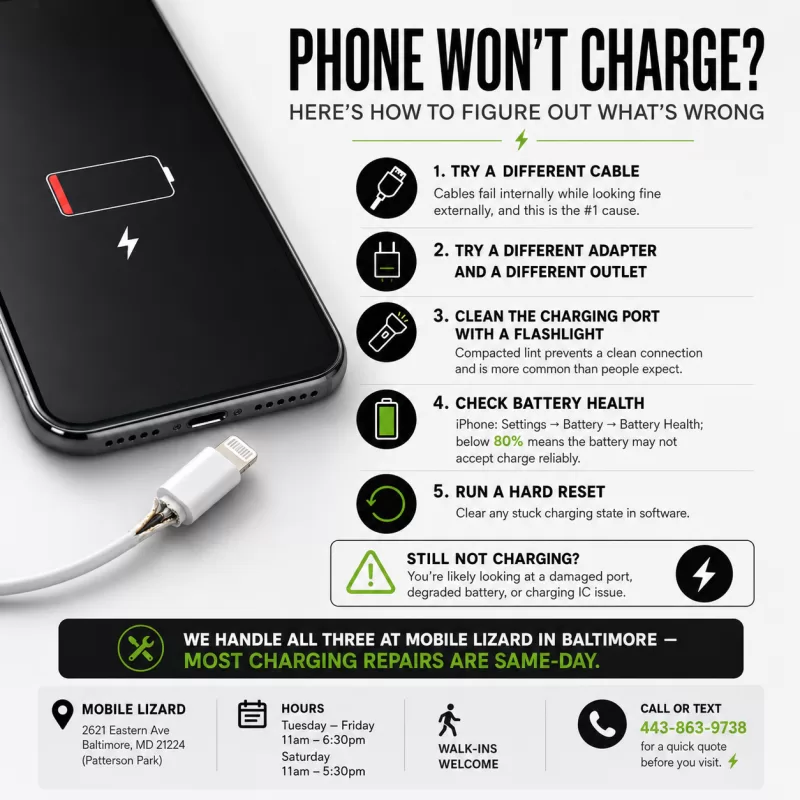
Try a different cable. Charging cables fail internally long before they show any external damage. The wire breaks at a flex point inside the insulation — usually at the connector end — and the cable looks fine but is electrically dead. If you’re using a budget or third-party cable, this is especially likely. See our post on why cheap charging cables damage your phone for the full explanation.
Try a different adapter. Wall adapters, car chargers, and USB ports on computers all fail. The brick might be the problem, not the phone or cable.
Try a different outlet or power source. A tripped outlet or failing USB port on a laptop delivers no or insufficient power. Try a different socket.
Layer 2: The Port
Look inside the charging port with a flashlight. This is the step most people skip. Lint and debris compact inside ports — especially Lightning ports — over months and years. If there’s visible buildup, the cable can’t make a clean connection even though it physically inserts.
A wooden toothpick (not metal, which can damage contacts) can gently dislodge lint buildup. Or come in — we do professional port cleaning regularly, and it takes about 15 minutes. It resolves charging problems completely more often than you’d expect.
Check for physical port damage. Is the port loose? Do cables wobble significantly? Is there any visible damage or corrosion inside? If yes, the port may need replacement.
Layer 3: The Battery
Check battery health. On iPhone: Settings > Battery > Battery Health & Charging. A battery below 80% capacity may not accept a charge reliably at all stages of the cycle.
Think about age. If your phone is 3–4 years old and you’ve never replaced the battery, the battery is almost certainly the primary issue if the accessories and port check out.
Layer 4: Software
Hard reset the phone. On iPhone (8 and later): Volume Up, Volume Down, hold Side button. On Samsung: hold Power and Volume Down for 10–15 seconds. A hard reset can clear a software-level charging state that’s stuck.
Check for an iOS/Android update. Charging management bugs are occasionally introduced by software updates and patched in subsequent ones.
Layer 5: Hardware Repair
If you’ve worked through the above and the phone still won’t charge, you’re likely dealing with:
- Damaged charging port — needs replacement
- Battery that won’t accept charge — needs replacement
- Charging IC issue — the chip on the logic board that manages charging; less common but repairable
At Mobile Lizard in Baltimore, we diagnose charging problems quickly and tell you exactly what we’re looking at before recommending any repair. Most charging port repairs and battery replacements are done the same day.
Services and Pricing
iPhone charging and battery repair | Samsung charging and battery repair
For iPhone screen pricing (if that’s also an issue), use our Repair Cost Calculator.
Related Reading
- Phone Not Charging? A Complete Troubleshooting Guide
- Why Cheap Charging Cables Are More Expensive Than You Think
- Phone Won’t Charge? Here’s How to Figure Out What’s Wrong
Inner Harbor and Central Baltimore — Walk-Ins Welcome
We’re at 2621 Eastern Ave in Patterson Park, a short drive from the Inner Harbor. No appointment needed. Tuesday–Friday 11am–6:30pm, Saturday 11am–5:30pm. Call or text 443-863-9738.